
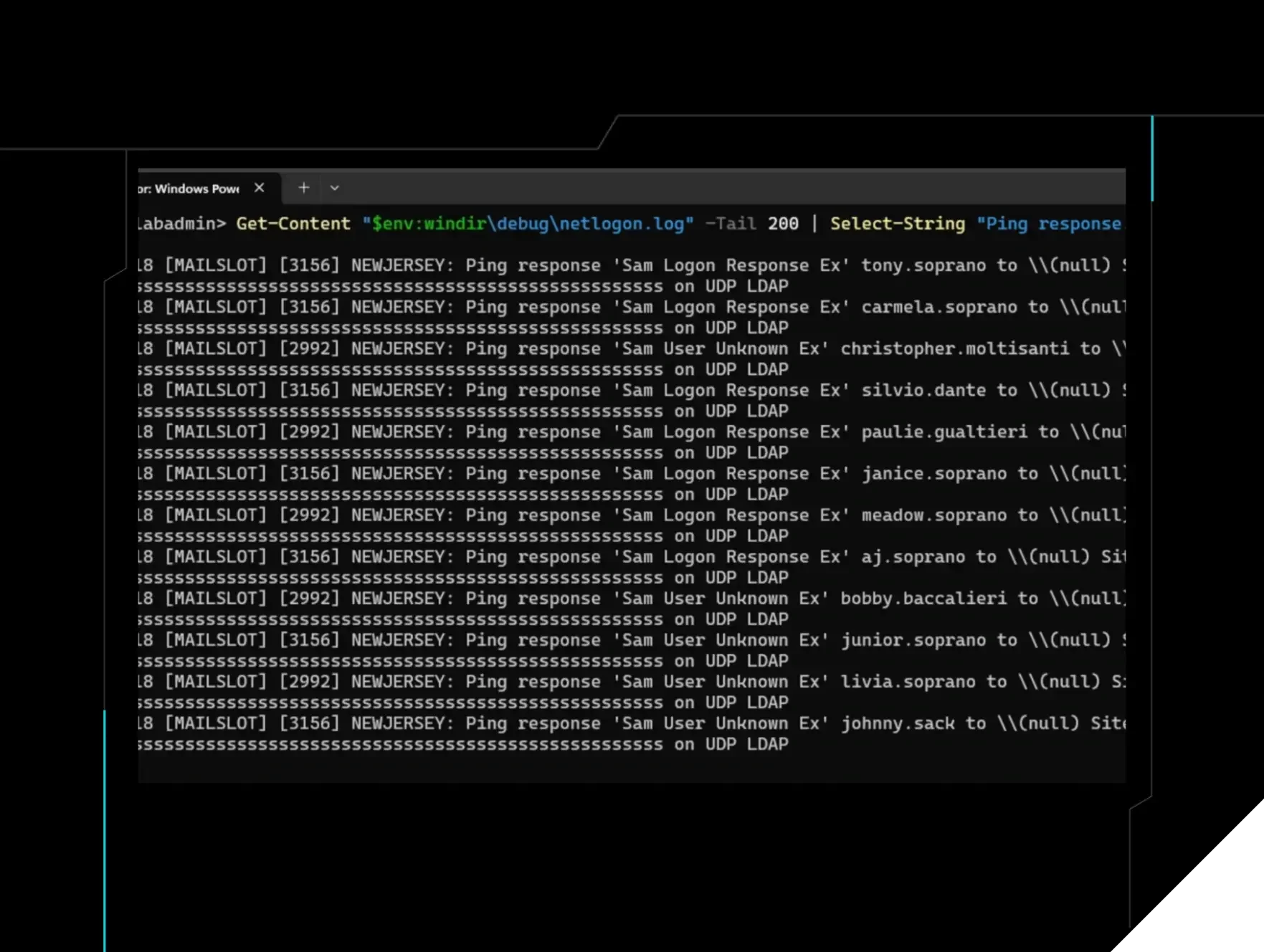
- What: Analysis of netlogon.log vs. Event 1644 for LDAP Ping detection
- Impact: Helps defenders understand limitations in event logging
Home Blog From Code to Coverage (Part 6): What netlogon.log Sees That Event 1644 Never Will Published: June 24, 2026 From Code to Coverage (Part 6): What netlogon.log Sees That Event 1644 Never Will By: Andrew Schwartz Summarize with AI Summarize ChatGPT Claude Perplexity Google AI Key Takeaways Event 1644 isn’t the answer for LDAP Ping detection because true LDAP Ping never reaches the LDAP engine. It gets handled through Netlogon on a separate code path, so 1644 is structurally blind to it. The big correction in this post is that ldapnomnom isn’t as invisible as its README claims. The code shows it uses TCP by default, which means Event 5156 can capture the real source IP, while netlogon.log records every username that gets probed. The real blind spot is true UDP cLDAP. In that case, netlogon.log still shows what was enumerated, but Windows event logs don’t give you attribution, so defenders need packet capture, NDR, firewall logs, or MDI to figure out who sent it. The practical detection strategy is correlation. For TCP-based LDAP Ping activity, netlogon.log gives defenders the usernames and Event 5156 gives them the source IP, while MDI can see both TCP and UDP activity but still depends on sensor coverage and threshold-based detection. The tool says no Windows audit logs. We checked. Part 5A proved the ADWS blind spot exists. Part 5B proved it’s solvable. Event 5156 gives you the real attacker IP behind localhost. The data was always there. Nobody was correlating it. Part 6 introduces a different blind spot. One that lives in a protocol your entire detection stack has never looked at, and a tool that is more detectable than its README claims. Then, of course, I remembered ldapnomnom . Here we go again ¯\_(ツ)_/¯ The README is quite direct: Quietly and anonymously bruteforce Active Directory usernames at insane speeds from Domain Controllers by (ab)using LDAP Ping requests (cLDAP) ... No Windows audit logs generated. No Windows audit logs. That's a strong claim. In this series, I don't take strong claims at face value. I read the source. Run it. Check the logs. Figure 1: ldapnomnom in action: anonymous, unauthenticated, and fast, pulling valid Active Directory usernames straight from a Domain Controller. The README claims it generates no Windows audit logs. The rest of this post checks that, one log source at a time. What I found: the README is wrong. Not completely wrong. The technique it's built on has a genuine detection gap. But the tool itself, as shipped, is more detectable than advertised. To see why, you have to go from the README down through main.go, into the underlying LDAP library, all the way to the Windows Filtering Platform. That's the From Code to Coverage methodology, and this post walks through every layer. Where LDAP ping fits Once an attacker has even a single low-privilege domain account, the attack surface expands dramatically. The rest of this series covers the authenticated side: how BloodHound, PowerView, and SOAPHound query the directory, what Event 1644 sees, when it doesn't fire, and how to detect low-and-slow enumeration that stays below every threshold. LDAP Ping is a pre-credential tool. It tells you who exists. Everything after that, what they have access to, what groups they're in, which accounts are Kerberoastable, requires authentication. The two phases have completely different detection stories. Three paths into active directory Before going into the tool, the detection story requires understanding which processing stack handles the query on the DC. There are three distinct paths, and each has a completely different logging behavior: Regular LDAP ADWS (PowerShell) cLDAP (True UDP) Identity Protocol TCP TCP UDP Port 389 / 636 (TLS) 9389 389 Authentication Required (bind) Required (Kerberos/NTLM) None, anonymous Who uses it BloodHound, Impacket, ADFind PowerShell AD module, SOAPHound, Soapy DC Locator, ldapnomnom (claims) Processing Processed by on DC LSASS / ntdsa.dll ADWS service → LSASS / ntdsa.dll LSASS / netlogon.dll Hits LDAP engine? Yes Yes (via ADWS proxy) No, separate dispatch Detection Event 1644 If expensive enough Shows localhost [::1] Structurally impossible Event 5156 With FPC auditing With FPC auditing UDP, WFP behaves differently Source IP visible Yes, direct No, localhost (solved in 5B) Absent from Windows logs; needs pcap, NDR, or MDI The critical split is in the 'Processed by on DC' row. Regular LDAP and ADWS both eventually reach the ntdsa.dll LDAP engine inside LSASS. True UDP cLDAP goes to the netlogon.dll handler, also inside LSASS, but a different code path entirely. Event 1644 is generated by the LDAP engine. This is why Event 1644 cannot log true cLDAP. The two code paths share no overlap in the query-processing path. LDAP ping is not LDAP search This is worth being precise about because it is the most common misconception about this technique. LDAP Ping and regular LDAP search share the wire format. Both are BER-encoded LDAP SearchRequests sent to port 389. But they are completely different operations processed by completely different code on the DC. Regular LDAP search: what BloodHound and PowerView use Requires authentication. The client must bind before issuing queries Queries the AD directory tree: users, groups, computers, GPOs, ACLs, everything Processed by ntdsa.dll, the LDAP server stack inside LSASS.exe That is why Event 1644 can see it. The query goes through the expensive query machinery that 1644 monitors That is why it needs credentials. Anonymous clients cannot read the directory tree by default LDAP Ping: what ldapnomnom and cldap_ping.py use Zero authentication required, anonymous by design Does NOT query the directory tree at all The filter (&(NtVer=...) (AAC=...) (User=...)) is dispatched to the netlogon.dll handler before it ever touches the LDAP engine Netlogon does a single targeted lookup against the directory NC for that sAMAccountName. No LDAP engine, no filter parsing, no candidate set walk Returns a hardcoded NETLOGON_SAM_LOGON_RESPONSE_EX blob. Not an actual directory entry, not the result of an LDAP search That is why Event 1644 never fires. The query never reaches the LDAP engine Think of it like this: Figure 2: Inside a Domain Controller, a regular LDAP search and an LDAP Ping share port 389 but run in different code paths, only one of them is visible to LDAP-layer auditing. ! This is not a logging configuration problem. There is no registry key, no verbosity setting, no Sigma rule that makes Event 1644 log LDAP Ping traffic. The two operations share a port but nothing else. The processing stacks are architecturally separate. The LDAP Ping is a Microsoft-specific mechanism for DC Locator: the process by which Windows clients find a Domain Controller on boot. It’s anonymous by design. It has to work before any user is authenticated. That is the door ldapnomnom walks through. The filter includes a User= element. When populated, the Netlogon service resolves it against the directory NC, applies the AAC bitmask test, and sets the response OperationCode based on the result: Opcode Symbolic name Account state on the DC Result 0x17 LOGON_SAM_LOGON_RESPONSE_EX Exists, enabled, matches AAC mask HIT 0x19 LOGON_SAM_USER_UNKNOWN_EX Does not exist MISS 0x19 LOGON_SAM_USER_UNKNOWN_EX Exists but DISABLED MISS, defender advantage 0x19 LOGON_SAM_USER_UNKNOWN_EX Exists but fails AAC bitmask test MISS Reference: [MS-ADTS] § 6.3.1.3 Operation Code for the value table, and § 6.3.3.2 Domain Controller Response to an LDAP Ping for the disabled/AAC routing logic. The bottom three rows are the defender asymmetry we'll see in the lab data. The attacker receives the same Unknown response whether the account doesn't exist, exists but is disabled, or exists but doesn't match the AAC mask. The DC has the information to tell them apart. The attacker does not. The wire response doesn't carry it, and at default logging levels the DC leaves no record of the request. Netlogon debug logging ( nltest /dbflag:0x2080FFFF ) does capture inbound pings as [MAILSLOT] entries when enabled, but it isn't on by default, and outside of active account-lockout troubleshooting, it's rarely turned on. The natural follow-up question: if LDAP Ping works anonymously and uses the same port as regular LDAP, can't an attacker use it to dump users, groups, computers, and SPNs without credentials? No, and the reason is architectural, not a configuration gap. The LDAP Ping isn't really an LDAP search. It's a fixed-function DC Locator probe wearing LDAP packaging. The DC matches the rootDSE base-scope + netlogon attribute pattern and routes to a switch statement in netlogon.dll , not to the search engine in ntdsa.dll . The handler returns a fixed-format NETLOGON_SAM_LOGON_RESPONSE_EX blob: DC identity, site info, capability flags, and if the request included User= , an opcode telling you whether that account exists and qualifies for logon. That's the entire output surface. There is no field for group membership, password last set, description, SPNs, or ACLs, and the filter grammar doesn't accept arbitrary LDAP. It's a fixed set of equality matches against named elements. Attackers can't broaden the query because there's no broadenable code on the other end. The pre-credential ceiling The complete anonymous AD attack surface. Everything an unauthenticated attacker can get from a DC: Operation What you get Credentials required rootDSE anonymous query Domain name, forest name, DC FQDN and IP, functional levels, site name, SASL mechanisms, DC role flags (PDC/GC/KDC/RODC) No LDAP Ping Per username: valid enabled / not found / disabled (indistinguishable to attacker) No Everything else Users, groups, computers, GPOs, SPNs, ACLs, descriptions, password policies, trusts, certificates. The full directory Yes The third row is a hard wall. Anonymous LDAP binds to port 389 will fail or return nothing useful for directory queries. AD has required at minimum a low-privilege domain account f