
The article describes evolved phishing tradecraft that moves beyond credential harvesting to exploit user trust and system familiarity, specifically detailing the "ClickFix" attack vector where users are manipulated via social engineering into executing malicious code through native system tools like the Run dialog under the guise of a fake CAPTCHA verification. This method bypasses traditional browser defenses and user training focused on checking URLs or avoiding executable downloads. The article emphasizes that standard security awareness training is insufficient and recommends implementing advanced simulations that replicate these modern, sophisticated attack techniques.
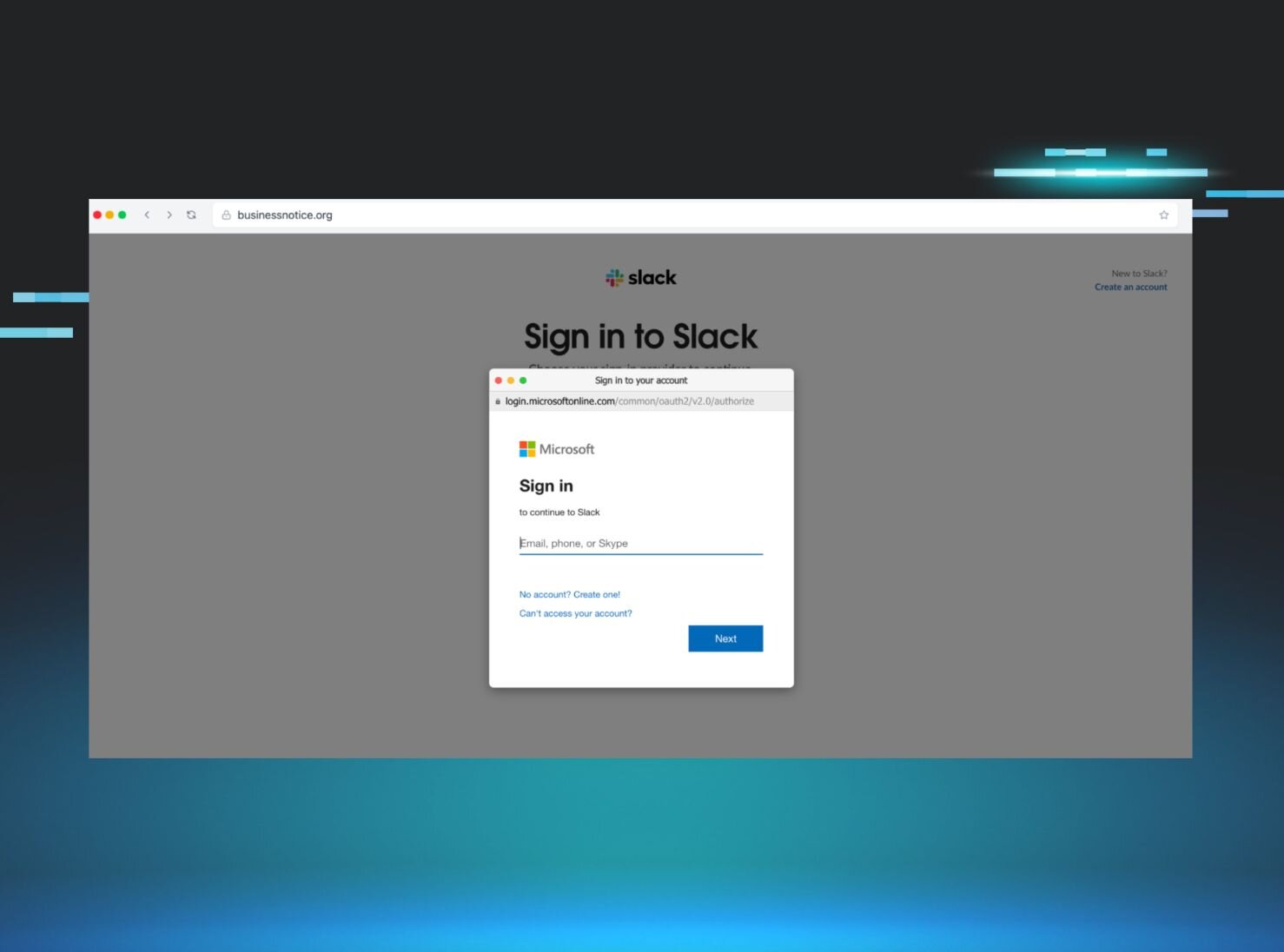
Home Blog Beyond the Login Field: The Evolved Phishing Tradecraft Your Users Aren't Ready For Published: June 22, 2026 Beyond the Login Field: The Evolved Phishing Tradecraft Your Users Aren't Ready For By: Shannon Grey James O’Leary Summarize with AI Summarize ChatGPT Claude Perplexity Google AI For years, standard Security Awareness Training (SAT) has conditioned users to look for the same old red flags: a misspelled domain name, a sketchy sender address, and a frantic call to action leading to a poorly cloned Microsoft login page. Today’s adversaries have largely moved past simple credential harvesting. Why spend time trying to brute-force or bypass multi-factor authentication (MFA) when you can just trick the user into bypassing it for you? Modern phishing attacks leverage sophisticated browser manipulation, malicious cloud app consent requests, and clever social engineering shortcuts that renders traditional 'check the URL' tactics insufficient as a standalone defense against sophisticated phishing campaigns At Huntress, we believe your simulated defenses should mirror real-world offenses. Our SOC manages millions of endpoints and identities through Managed EDR and ITDR, giving us direct visibility into the tactics and tradecraft attackers are actively using to compromise organizations. These threats have evolved well beyond what most simulated phishing scenarios cover. That’s why we’ve populated our SAT library with 'Featured' scenarios that replicate these highly evolved, complex threat actor tradecraft. Here is a look inside the advanced tactics we’re simulating—and how we help your users spot the setup before a real attacker targets them. 1. ClickFix Attackers have realized that convincing a user to download and run an .exe file is getting harder. Instead, they are manipulating users into executing malicious code via standard system tools under the guise of fake CAPTCHA to prove themselves as human users. See here . Figure 1: In a ClickFix attack, targets are asked to complete a series of steps, leading to them unwittingly executing malicious code The actual threat : ClickFix is a highly deceptive social engineering technique that completely sidesteps traditional browser defenses by weaponizing user muscle memory and routine troubleshooting habits. The attack intercepts the victim with a simulated CAPTCHA prompt. Instead of forcing a suspicious .exe file download that would trigger browser warnings and user anxiety, it manipulates the user into executing a precise sequence of standard keyboard shortcuts (Win + R, Ctrl + V, and Enter) to manually paste and run the malicious command directly within their native terminal. How we replicate it : The scenario begins with a targeted phishing email disguised as a DocuSign document requiring an immediate electronic signature. When the user clicks the embedded link to view the document, they are directed to a simulated landing page where a fraudulent verification overlay intercepts them, displaying these instructions: To better prove you are not a robot, please: Press & hold the Windows Key + R. In the verification window, press Ctrl + V. Press Enter on your keyboard to finish. They are then asked to paste this command into their terminal using a set of key combinations. Cybercriminals weaponize these standard system shortcuts to prompt victims to unknowingly download infostealers, malware, and malicious RATs/RMM tools. See demo here : https://phishingdefense.org/phishing/command-execution-demo?trial=1 Why it works: Exploits Troubleshooting Habits : Users are deeply conditioned to follow step-by-step technical instructions to resolve any roadblocks in access. Bypasses "Download Anxiety": Standard security awareness has successfully taught users to fear downloading and opening random .exe files. This attack sidesteps that reflex entirely by providing a keyboard combo done in the terminal instead, which prompts a GUI-less download entirely. 2. Browser-in-the-Browser (BitB) Standard security training tells users, "Look at the address bar to ensure you're on a legitimate site." Browser-in-the-Browser attacks completely weaponize that advice. Figure 2: BitB attacks leverage pop-ups in the browser to steal victim credentials The actual threat : The attacker creates a completely simulated browser window inside an existing, legitimate webpage. When the user clicks a "Sign in with Google" or "Sign in with Microsoft" button, a pop-up appears. It looks exactly like a native browser window, complete with a green padlock, a perfectly forged URL, and an interactive address bar. In reality, it’s just a rendered HTML element stealing credentials and MFA tokens in real time. How we replicate it : Our BitB scenarios present users with authentic-looking third-party authentication popups inside a trusted context. It teaches users to look for anomalies—like trying to drag the pop-up window outside the main browser boundary (a fake window can't leave the canvas). See demo here : https://phishingdefense.org/phishing/browser-slack?trial=1 Why it works : Weaponizes compliance training: For a decade, the gold standard of security advice has been: "Check the address bar and look for the padlock." This attack perfectly replicates those exact visual trust indicators, turning the user's compliance training against them. SSO desensitization: Users encounter "Sign in with Google, Apple, or Microsoft" pop-ups dozens of times a week. Because this workflow is so mundane and ubiquitous, users log in on autopilot without questioning the context of the window. Flawless visual fidelity: Because the fake window is rendered using high-quality HTML/CSS, it is visually indistinguishable from a legitimate native browser window, leaving zero clues for the naked eye. 3. OAuth consent phishing (ConsentFix) Why steal a password when you can just ask for permanent access to the entire application? With the rise of MFA, adversaries have shifted heavily toward illicit consent grants. Figure 3: ConsentFix plays on ClickFix techniques to steal OAuth authorization codes The actual threat: ConsentFix is an advanced, browser-native phishing technique that combines "ClickFix"-style social engineering (fake CAPTCHAs or verification screens) with OAuth authorization code theft. It primarily targets Microsoft Entra ID (Azure AD) environments. How we replicate it: In our ConsentFix scenario, the ‘attacker’ bypasses browser security boundaries by tricking the user into dragging the identity icon from a legitimate Microsoft window into a fake Azure domain user verification drop zone. By performing this simple action, the victim unknowingly hands over the text of the complete redirection URL, which contains their active Microsoft authorization code. The attacker's backend infrastructure then extracts this parameter and sends a request to Microsoft’s token endpoint. Once Microsoft accepts, the threat actor receives actual access and refresh tokens. While the victim is physically dragging a temporary authorization code, they are effectively handing over the golden key that the attacker instantly trades for full, long-term session access. See demo here : https://phishingdefense.org/phishing/consentfix-demo?trial=1 Why it works: Zero credential reassurance: Because the prompt doesn't ask the user to type in a password or enter an MFA code, it doesn't feel like a login trap. Combats "prompt fatigue": In modern cloud environments, users are bombarded with cookie consents, privacy updates, and application permissions. Most users suffer from click-fatigue and will instinctively click "Accept" or "Allow" just to make the barrier disappear. Inherent infrastructure trust: The consent screen itself is not a replica—it is genuinely served by Microsoft or Google. Because the platform hosting the prompt is legitimate, the user implicitly trusts the malicious request embedded within it. 4. Device code phishing If you’ve ever authenticated into an account or application with a unique code, you already understand the underlying mechanics of this attack. This technique doesn't steal credentials; it adds a new authorized device to the victim’s account by abusing an OAuth flow originally designed for input-constrained devices. At Huntress, we have seen device code phishing surge; this type of attack has been built into phishing-as-a-service (PhaaS) offerings such as EvilTokens. See here . Figure 4: In device code phishing, targets are asked to complete a device code authentication flow The actual threat: The attacker sends an email or chat message (often masquerading as an urgent IT notification or a Microsoft Teams invite) directing the user to a completely legitimate login URL (such as microsoft.com/devicelogin ). Because the URL is 100% authentic, email filters don't block it, and a user's instinct to "check the address bar" tells them it’s safe. The user is prompted to enter a specific code provided in the phishing hook. The moment they type it in and log in—even if they successfully pass an MFA challenge—they aren't logging themselves in. Instead, they are authorizing an OAuth token for the attacker’s device. The adversary now has persistent access to the user's entire cloud workspace without ever needing to know their password. Go deeper: Device code phishing is easier to understand with a concrete example. Our new report walks through a documented campaign step by step, including the infrastructure, the victim experience, and specific hardening recommendations. Read it → How we replicate it: Our library includes simulations that mimic these out of band authorization requests. Users are presented with realistic IT maintenance or application synchronization alerts that provide a code and link out to real login portals. The training moment hits immediately if the user attempts to input the code, teaching them the golden rule of device authorization: Never enter a code you didn't personally generate. See demo here : https://phishingdefense.