
The article details a post-compromise attack chain where a threat actor leveraged multiple critical vulnerabilities in Adobe ColdFusion 2018 (CVE-2023-26360, CVSS 8.6; CVE-2023-29298, CVSS 7.5; CVE-2023-29300, CVSS 9.8) for initial access, then executed an extensive defense impairment campaign to disable security tools, clear logs, and dump credentials. Following initial remediation, the attacker re-entered through a prematurely restored server, highlighting the critical need for verified patching and closure. Organizations are advised to prioritize foundational security measures, including comprehensive logging and timely patching of affected ColdFusion versions.
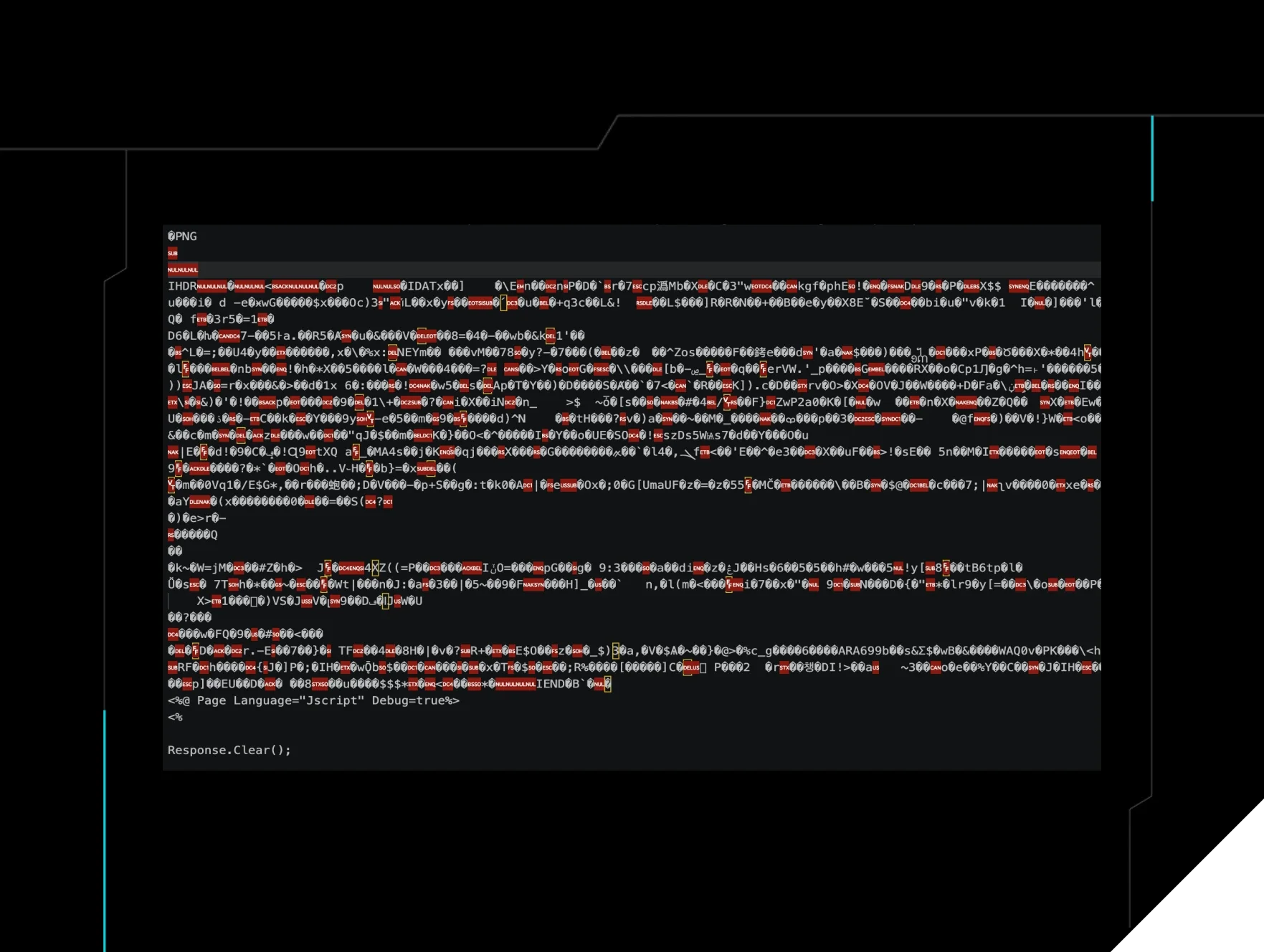
Home Blog Defence Impairment Olympics Published: June 29, 2026 Defence Impairment Olympics By: Mark O'Halloran Lindsey O'Donnell-Welch Summarize with AI Summarize ChatGPT Claude Perplexity Google AI Key Takeaways We recently detected an incident on June 7 that started with simple enumeration commands - but our investigation into the attack showed the threat actor taking aggressive steps to hide their tracks. The investigation into the attack initially showed a few defence impairment techniques, like steganography and timestomping. However, our investigation broadened when we found a breadcrumb left behind - and batch script called i.bat - that showed the threat actor attempting to disable Defender, kill Sysmon and Filebeat, uninstall the ModSecurity WAF, downgrade WDigest credential protection— all before Mimikatz was executed to dump credentials. Following the SOC's initial response and delivery of remediation steps, a window of exposure occurred when the server was brought back online prior to complete patching. The threat actor leveraged this premature reconnection to continue their attack. This scenario highlights a common challenge in incident response: thorough closure and verified remediation are just as critical as the initial detection. Organizations can defend against these techniques with foundational security measures, including implementing sufficient and correctly configured logging on their servers and endpoints, and ensuring software is updated and patched. Acknowledgements: Special thanks to Adrian Garcia, Amelia Casley, Olly Maxwell and Anton Ovrutsky for their contributions to this investigation and write-up. Background At Huntress, we have visibility into various parts of a threat actor's attack chain: including how they enter the victim's environment (initial access), how they research the environment (enumeration), and how they move around the environment (lateral movement). One tactic that we see a fair amount of is defence evasion and defence impairment; or specific measures threat actors take to hide their tracks during an incident and to disable defence mechanisms. We recently responded to an incident on June 7 where a threat actor initially performed enumeration activity before later carrying out almost a dozen different types of defence impairment commands, including disabling the IIS logs, tampering with Microsoft Defender, using WMI Event Consumer to clear the Windows Event Logs, using timestomping, and more. We have outlined the defence impairment tactics we saw in this incident; by better understanding these techniques and how they play out in a targeted environment, organizations can get a stronger sense of where they should prioritize their defenses and look for signs of potential compromise. A steganographic webshell: The first commands On June 7, Huntress responded to a web server compromise spawning from a webshell that was uploaded to a vulnerable server by a threat actor. Due to insufficient logging, Huntress was unable to determine the exact initial access mechanism. There was, however, some evidence that the particular server had potentially suffered an Adobe ColdFusion exploitation attempt. Upon closer inspection of the historical logs, we found evidence of possible exploitation of ColdFusion bugs, including a critical remote code execution vulnerability ( CVE-2023-26360 ), improper access control bug ( CVE-2023-29298 ), and deserialization flaw ( CVE-2023-29300 ). The evidence that we did have stemmed from the presence of known targeted endpoints in historical logs: CFIDE/adminapi/_datasource/setmsaccessRegistry.cfm /CFIDE/adminapi/_datasource/setsldatasource.cfm /CFIDE/adminapi/_datasource/setdsn.cfm /CFIDE/adminapi/_datasource/formatjdbcurl.cfm /CFIDE/adminapi/_datasource/getaccessdefaultsfromRegistry.cfm /CFIDE/adminapi/_datasource/geturldefaults.cfm /CFIDE/adminapi/customtags/l10n.cfm /CFIDE/adminapi/serverinstance.cfc /CFIDE/adminapi/servermonitoring.cfc While normally, the access control restricts external access requests for resources that are found within these URL paths, CVE-2023-29298 enables improper access to these paths. Post compromise, the threat actor started executing common enumeration commands such as whoami , which Huntress detected, as seen in Figure 1. Two things stick out regarding this detection. First of all, it conveniently had the directory of the offending webshell ( wwwroot\Images ) within its command line. Second of all, the offending command spawned from the parent process w3wp.exe , an IIS worker process that typically handles web requests. This is a telltale sign of a potential webshell, because a legitimate web application rarely has a reason to run OS reconnaissance commands like whoami . Its job is instead serving web content, not enumerating the host. Figure 1: Enumeration command spawning from w3wp , a classic indication of a potential webshell Huntress reviewed the wwwroot\Images directory and observed a recently created .aspx file, which was an unusual sight for a directory that was presumably for images. Upon closer inspection of the file, we found that the threat actor had used steganography to hide a webshell called UA4fp7R.aspx within an image. Figure 2: The webshell ( UA4fp7R.aspx ) opened using an image viewer Figure 3: UA4fp7R.aspx opened in a text editor. Note the human legible JavaScript starting at the end of the page Figure 4: The webshell payload embedded in the image As seen in Figure 4, x4F x4E x45 x50 x49 x45 x43 x45 is hexadecimal encoded, and decoded it spells ONEPIECE . This is an interesting Indicator of Compromise (IoC) that ended up appearing in all the webshells found throughout this attack. Another string embedded in the .aspx file is decoded to spell x_best_911 . When the file receives the command, it sends the decoded ONEPIECE string back, and when it executes the command it sends the string decoded as x_best_911 back. These strings are likely a response to indicate that the shell is operational. The SOC swiftly queued the webshell for deletion and provided the impacted organization a list of remediation action items to protect the webserver. Unfortunately, however, the server was put back online before any remediations were carried out fully, allowing the threat actor to continue their attack three days later. This time, they came prepared with an array of defence impairment techniques with the aim of trying to hide their footprints. A stegano-webshell from the future and enumeration On June 10, the threat actor uploaded another webshell ( WRBYTR5750images.aspx ) and conducted additional enumeration for the iis_user account using net , which was again promptly detected and remediated by the SOC. Figure 5: The threat actor enumerating iis_user Unfortunately, however, after the SOC remediated the webshell, the vulnerable server was put back online a second time. That allowed the threat actor to return once again on June 11 and re-upload the webshell, but this time before executing a number of enumeration commands, they used timestomped MAC metadata to prevent investigators from determining when the webshell appeared on the system. Outside of the steganography, this was the first inkling of a defence evasion technique we came across: timestomped MAC metadata involves file timestamps that attackers deliberately falsify to make malicious files blend in and corrupt the forensic timeline investigators rely on. Figure 6: The MAC times of the timestomped webshell Following the reuploading of the webshell, the threat again attempted to enumerate the iss_user account but did not spell it correctly, as seen in their commands executed below. Figure 7: The threat actor returns on June 11 A closer look at Windows Registry gave us a better understanding of what was happening. The threat actor first enumerated the software installed on the system via a reg query to HKEY_LOCAL_MACHINE\SOFTWARE . As seen in the queries below, threat actors in particular enumerated free open-source file transfer FTP client FileZilla, potentially as a living-off-the-land technique to exfiltrate data further down the attack chain. REG QUERY "HKEY_LOCAL_MACHINE" REG QUERY "HKEY_LOCAL_MACHINE\SYSTEM" REG QUERY "HKEY_LOCAL_MACHINE\SOFTWARE" REG QUERY "HKEY_LOCAL_MACHINE\SOFTWARE\FileZilla 3" REG QUERY "HKEY_LOCAL_MACHINE\SOFTWARE\FileZilla 3\fzshellext" The Defence Impairment Olympics opening ceremony Despite the pretty impressive attacker tradecraft displayed before, the threat actor left us a breadcrumb in the form of the entire defence impairment script i.bat on the endpoint. The Huntress SOC was able to grab it before the threat actor had the chance to delete it. The script contained an array of defence impairment techniques and ultimately led to credential dumping. The first action the script took was turning off the http IIS logging, which is crucial for identifying other webshells that could have been POSTED by the attacker: %windir%\system32\inetsrv\appcmd set config /section:httpLogging /dontLog:True The script then executed a large number of Microsoft Defender configuration commands to disable and hamper Defender to prevent real-time monitoring, script scanning and sample submission among other things via PowerShell cmdlets. Then it executed a separate DisableDefender.ps1 script prior to deleting the file. powershell -c "Set-MpPreference -DisableRealtimeMonitoring $True" powershell -c "Set-MpPreference -DisableBehaviorMonitoring $true" powershell -c "Set-MpPreference -DisableIOAVProtection $true" powershell -c "Set-MpPreference -DisableScriptScanning $true" powershell -c "Set-MpPreference -MAPSReporting Disabled" powershell -c "Set-MpPreference -MAPSReporting 0" powershell -c "Set-MpPreference -MAPSReporting Disabled" powershell -c "Set-MpPreference -SubmitSamplesConsent NeverSend" powershell -c "Set-MpPreference -SubmitSamplesConsent 2" powershell -NoProfile -ExecutionPolicy Bypass -File DisableDefender.ps1 del DisableDefender.ps1 W