
- What: Huntress launches a new dashboard for faster identity investigations
- Impact: IT teams can now investigate identity-related issues more efficiently
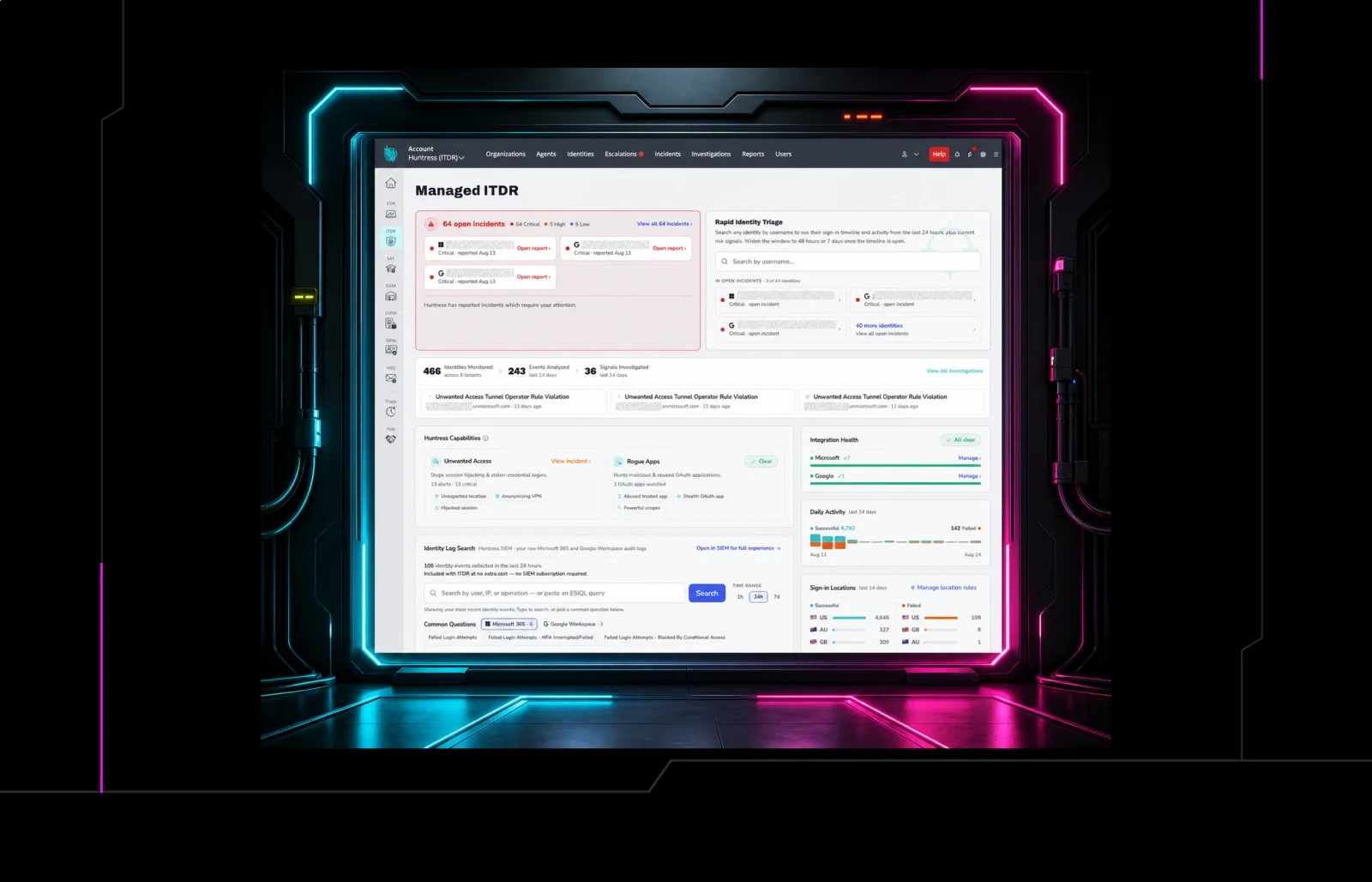
Home Blog The New Huntress Managed ITDR Dashboard: More Context. Faster Answers. Published: August 27, 2026 The New Huntress Managed ITDR Dashboard: More Context. Faster Answers. By: Erin Meyers Summarize with AI Summarize ChatGPT Claude Perplexity Google AI When an employee says, "I clicked a link. Am I compromised?" you probably don't want to spend the next 20 minutes jumping between tools, logs, and screens trying to piece together an answer. You want to know what happened. You want the context to decide whether it matters. And if something is wrong, you want to be able to act. That's the idea behind the new Huntress Managed ITDR dashboard, now generally available to all ITDR customers. The redesigned dashboard brings more identity data, investigation context, and self-service capabilities into one place, giving you a clearer view of what's happening across the identities you protect and faster ways to investigate when something doesn't look right. But this launch is about more than a new dashboard. It represents where we're taking Huntress Managed ITDR next. New Huntress Managed ITDR Dashboard Managed ITDR Should Do More Than Tell You When Something Is Wrong Huntress Managed ITDR was built around a simple reality: attackers increasingly target identities, and stopping them requires more than generating another alert. That's why the Huntress Security Operations Center (SOC) investigates identity threats for you and takes action when malicious activity is detected. But not every security question begins with a Huntress incident. Sometimes it starts with an employee reporting something suspicious. An unusual login. A worried client calling their managed service provider (MSP). Or an IT administrator who simply wants to understand what happened with a particular identity. Those moments require something different: fast access to the evidence needed to investigate and validate identity activity yourself. Historically, that context could be spread across different parts of the product. The redesigned dashboard begins bringing it together. Instead of functioning primarily as a status page, the new dashboard is designed to become a more actionable identity investigation surface: a place to see active risk, understand what Huntress is investigating, dig deeper into identity activity, and take action when necessary. The result is a Managed ITDR experience that gives you more proof, more context, and a clearer place to start. Rapid Identity Triage: Go From "Is This User Compromised?" to Answers Faster One of the biggest additions to the dashboard is Rapid Identity Triage, built specifically for those moments when you need to investigate a user quickly. Rapid Identity Triage enables speedy identity searches Search for an identity by email address to immediately see their activity from the past 24 hours, along with current risk signals and incident context. From a single view, you can examine recent sign-ins, locations, VPN or proxy usage, browsers, failed login activity, and other contexts that can help you understand whether behavior looks expected or suspicious. An AI-assisted Quick Summary also helps surface the important details without requiring you to manually piece together every event. Need to dig further? Expand the activity window to 48 hours or seven days. Need to share what you found? Export the activity timeline. And if the investigation shows that immediate action is warranted, you can revoke active sessions or disable the account directly from the dashboard. Rapid Identity Triage turns a common security question into a workflow: find the identity, understand the activity, and take action without bouncing between screens. Failed Login Characterization: Put Failed Logins in Context A failed login by itself doesn't tell you much. Where it came from (and the infrastructure behind it) can tell you a lot more. Clear view of login activity across locations, VPNs, residential proxies, tunnels, and datacenters Failed Login Characterization gives you a clearer view of failed login activity across the identities you protect, including where attempts originated and whether they came through infrastructure such as residential proxies, VPNs, tunnels, or datacenters. Instead of looking at a pile of failed authentications and trying to determine which deserve attention, you get additional context to help distinguish everyday authentication noise from activity worth investigating. The dashboard also surfaces successful and failed sign-ins by location alongside activity associated with specific VPN, proxy, and datacenter providers, giving you a much richer picture of how identities are being accessed. It's another step toward making identity telemetry useful, not simply visible. Quick SIEM Search: Your Identity Logs, Without the Digging Sometimes you already know the question you want to ask. You just need the data to answer it. That's where Quick SIEM Search comes in. Huntress ingests the entirety of the Microsoft Entra Unified Audit Log and stores it in the Huntress SIEM for up to one year at no additional cost for ITDR customers. The new dashboard brings that data directly into the ITDR experience. Search identity events by user, IP address, or operation, or enter an ES|QL query when you need to dig deeper. We've also pre-populated common searches for questions you're likely to ask, such as failed login attempts, failed MFA attempts, Conditional Access blocks, Global Admin role assignments, MFA changes, and events within a particular session. You get faster access to the raw identity activity behind an investigation, while the full Huntress SIEM experience is still there when you need it. One Place to Understand What's Happening Those three features are the headliners, but the redesigned dashboard is intended to make the entire ITDR experience easier to navigate. At a glance, you can see active incidents requiring attention, identities and events monitored by Huntress, recent investigations, sign-in activity and locations, integration health, and coverage across Huntress ITDR capabilities. That matters because good identity security isn't just about collecting more data. It's about making the right data useful at the right moment. When Huntress detects malicious activity, our SOC is there to investigate and respond. When you need to answer a question, the dashboard gives you a faster path to the evidence. The Dashboard Is the Beginning, Not the Destination The redesigned dashboard will now become the default experience for Huntress Managed ITDR, with the previous dashboard being phased out over the next few weeks. But General Availability isn't the end of the dashboard work. It's the foundation for where we're taking Managed ITDR. Our goal is to make ITDR the place you go after something suspicious happens - the primary identity view for understanding active risk, seeing what Huntress has already investigated or acted on, determining what still needs attention, and getting the evidence necessary to make the next decision. Over time, that also means making the experiences across Huntress feel more connected. Identity detection doesn't exist in isolation from identity posture, endpoint activity, email threats, or the other signals Huntress sees across an environment. As those experiences come together, the goal isn't to give defenders more dashboards to monitor. It's to give them better answers, clearer actions, and less work required to get there. The new ITDR dashboard is an important step in that direction. And we're just getting started. 👉 Interested in trying out the new Managed ITDR dashboard yourself? Sign up for a free, 14-day trial of Huntress Managed ITDR today! Summarize with AI Summarize ChatGPT Claude Perplexity Google AI Categories Huntress News See Huntress in action Our platform combines a suite of powerful managed detection and response tools for endpoints and Microsoft 365 identities, science-backed security awareness training, and the expertise of our 24/7 Security Operations Center (SOC). Book a Demo Share You Might Also Like Truman’s Take: A Product Researcher’s Insights on Managed Learning In this new blog series, we’ll explore the managed episodes from Huntress Managed SAT, dive into the topics, and gain insight into why these episodes are relevant right now. Learn More Debunking 5 Major macOS Myths Let Huntress debunk the biggest Mac security myths. macOS is now a popular target for hackers, so learn the truth about its vulnerabilities and discover practical steps to enhance protection against cyber threats. Learn More What is Behavioral Analysis in Cybersecurity? Behavioral analysis is one of the most powerful ways to hunt down attackers. However, it’s a somewhat misunderstood element—it’s the human element that catches what AI and systems miss. Let’s uncover it and figure out where and how it fits in. Learn More “Advanced” Intrusion Targeting Executive at Critical Marketing Research Company An intrusion at a market research company used living-off-the-land techniques, but Huntress detected and mitigated the threat, uncovering tactics like service creation and registry manipulation. Learn more and get detection guidance and mitigation strategies. Learn More Assisted Remediation in Action Learn how Huntress helped an MSP partner contain and remediate an Emotet/TrickBot infection with Assisted Remediation. Learn More Hiding in Plain Sight with App Domain Manager Injection Uncover how attackers use App Domain Manager injection to run code inside trusted .NET apps by tweaking config files and bypassing application controls. Learn key strategies to detect and stop these attacks. Learn More The Devil, Eight Million Emails, and a Whole Lot of Milk A compromised terminal server became a phishing stager. A fake Boots survey aimed at 8.9 million inboxes, with the payload on a hacked Bolivian government site. Learn More Rapid Response: ASUS Live Update Attack (Operation ShadowHammer) Periodically, a large